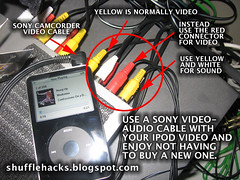
This is one of my own hacks and although it's not for the shuffle I couldn't stand to not share if with you loyal readers. I just got a iPod video and wanted to hook it up to the TV. I didn't have the "Official" ipod video cable but I did have the one from my Sony Digital 8 camcorder. I tried to hook it up but it didn't work. I then pulled the plug out a bit and got a scrambled video signal. I then switched the cables around to see if one of the others had the video signal. Success. It turns out with my particular Sony video cable that while plugged into the iPod the RED cable gave me the video signal and the Yellow and White gave me the sound. Hurray for the hacker spirit! It's always nice to save money when you can. (That Xbox 360's not getting any cheaper.)
-Jim
[link to flickr photo page]


5 comments:
Argh! I tried using my Sony cable, too, but I gave up to easily, I guess! Thanks for poking around... now I have a spare! :)
i tried this too..got the mixed video signal..had the sound comin from white and yellow..but nothin from red in video..any suggestions?
set your ipod to TV OUT
Thank you so much! I've been struggling with the fact that my iPod was putting a buzzing sound out and a picture full of lines for a while. Then I read about how Apple switched up the order in the iPod than the normal camcorder cable, which led me to your post. As soon as I switched it, all is well. Works beautifully now!
I haven't tried that trick. I think it is going to be so much fun. I will going to try that. I just wish that everything goes well. Thank you for posting this info.
Post a Comment